Showing posts with label Two Factor Authentication. Show all posts

Saturday, May 29, 2021

Cybersecurity: 2FA or not 2FA? That’s the question…
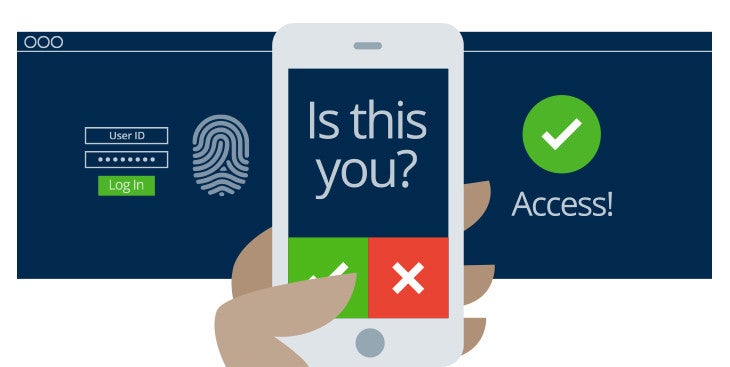
Graphic courtesy of  Marshall University IT Department


Okay, you’ve learned how to spot fraudulent e-mail and text messages and have followed my advice about creating different, strong passwords for each of your online accounts. Now you can relax, knowing all your important information is safe and secure, right? 

Wrong! 

No matter how unguessable you think your password is or how careful you are about avoiding online scams, your credentials could still be stolen by hackers who target the companies who store those passwords. That’s why you need to further secure your important accounts by using something called Two Factor Authentication (2FA) or Multi-Factor Authentication (MFA).  

Doing this creates an extra step to prove your identity when you go to login to a website, device or application, by having you enter a second piece of information completely separate from your username or password.  

Yes, this extra step may be inconvenient, but it provides an extra layer of security because the more time and hoops you make a hacker jump through, the more likely it is that he or she will just give up and move on to another victim whose account is easier to crack. 

Even for cyber criminals, time is money, and the goal of any good cybersecurity strategy shouldn’t be to
stop every attack. Frankly, that’s not possible.  It should be to put so may barriers up between you and the hackers, that it’s simply not worth their time to victimize you.  

So how exactly does all this work? And isn’t that second piece of information just as vulnerable to being stolen as a password? 

No.  

You see the way 2FA/MFA typically works is that the site or device you are trying to log in to either sends that second piece of information to another device in your possession or prompts you to enter information from an app you have on that second device. Either way, that information – usually a six-digit code – constantly changes and is only good for a few minutes. So even if a hacker manages to get ahold of the code, they can’t keep using it over and over again to gain your account like they could a stolen password.   

Like all things, this method is not fool-proof, and there are ways around it even without direct access to your second device. But those methods are harder to do and hackers may decide it’s not worth the time and trouble and move on to someone else. 

Currently, most people usually use their cell phone as that secondary device to setup multi-factor authentication, and that’s what I’d recommend doing if you have one. It’s more secure than having messages sent to an e-mail account which is easier to hack than a device you almost always have with you anyway.  

If you decide to use your cell phone for this, I’d also recommend registering another mobile device -- if you can -- as a backup. This way if you lose your phone, you can have your cell phone provider help you remotely wipe it, disabling its ability to do MFA, yet still be able to authenticate with the other device.  

There are several different ways MFA works. Here are the five most common ones: 

 ‘Push’ Notification to a Mobile Device  

With this method, the account that you are trying to log into will create a popup message on your cell phone or other mobile device notifying you that someone is trying to log in and ask you to either allow or deny the attempt.  

It’s called a “push” notification because the website that’s being logged into initiates the communication and allows you to hit a big red or green button to either allow or deny the login right from that notification.  

What makes this method so secure is that A) you get real-time notification when someone is trying to log in to your account and B) any bad guy trying hack into your account must have physical access to your mobile device to be able to log in. 

The downside to this is not all websites that support MFA support push notifications which leads us to… 

Text or SMS Notification 

Similar to a push notification, the account that you are trying to log into will initiate communication, but this time, instead of giving you the yes/no option in a quick popup message, it will send you a text message with a six -or eight- digit code you will need to manually enter on the website’s login page to continue. 

It has the same advantages of a push notification but does have the additional downside of having to manually enter a potentially long code from your phone.  

Mobile App on your device 

The third method, involves you having to download a mobile app such as Google Authenticator , Duo Mobile, Microsoft Authenticator  or LastPass Authenticator. Each of these apps constantly generates changing codes based on an algorithm that only it and the site you are trying to login to know.  

So when you go to login to that website, the website will only let you in if the code its algorithm creates matches the code the algorithm on your phone produced. Since the codes are set to change every minute or two, it’s extremely unlikely a cyber crook could guess that password in so short a time.  

Again, the main advantage here is that the attacker has to have physical access to your mobile device, but does come with the disadvantage of not getting any real-time notifications should someone else try to log into your account. 

If you don’t know which one of these apps to use, PC Magazine’s recent review of The Best Authenticator Apps for 2021 can help you decide. And don’t feel like you have to choose only one of them. I use two different ones on my phone without issue. (However, having only one does make things easier to manage).  

Physical Token 

Physical tokens are small key-chain sized devices that do exactly the same thing as the mobile apps. They were prevalent in the days before smart phones became ubiquitous and have the same advantages and disadvantages of those mobile apps. There are also versions that look like a USB thumb drive that plug into your computer and provide the second form of authentication automatically.  

Email Code Method:  

This method works similarly to the text/SMS code method except that the code is sent to an e-mail account that you told the website to use. This is perhaps the least secure method of them all, because cyber criminals do not need physical access to a device in your possession and assuming you haven’t secured this account with 2FA, only need to guess your password to get in.  

Does it mean you should not use it? 

As a primary authentication method, I’d advise against it, but it’s not bad to have it set up as a backup or third way to authenticate should your phone be unavailable. (Some sites allow you to set multiple ways to authenticate while others only allow one way, which is why it’s called either Two- or Multi- factor authentication.) Just be sure to make sure you have the strongest possible password on that account. 

Setting up 2FA/MFA 

How you set all this up will differ with each website you use. But the options you will need to configure will often be found on the settings page under either the security or login sections. 

Here are two examples of how to access them in Facebook and Google: 

FACEBOOK:

  1.  Click on the account dropdown button next to your profile picture and from the dropdown menu and select the Settings and Privacy option.


  2.  When the dropdown menu changes, click on the Settings option 


  3. When the settings page loads, click on Security and Login on the left-hand rail and look for the Two-Factor Authentication section and switch it to ON to begin setting it up.


GOOGLE/GMAIL:

  1. Make sure you are logged into your Google or Gmail account, and click on the button that looks like checkerboard on the upper right of the page and from the dropdown pick menu that appears click the Account button.  


  2. Click on the Security link in the left-hand rail, then scroll down the page until you come to the Signing in to Google section.  Under that click on the arrow next to 2-step verification to begin setting it up.  


Is going through all this on every site you use worth it?  

The answer depends on how much time and aggravation it will take you to recover a hacked social media account, or how much money you could potentially lose if a cybercrook gains access to your online financial accounts.  

But one thing you should always keep in mind is that 2FA/MFA isn’t perfect and cyber cooks are constantly coming up with ways to circumvent security. So just because you set this up doesn’t mean you can now relax your guard. If anything, it should only make you more vigilant about cybersecurity than ever.  
 

Sunday, February 28, 2021

Cybersecurity speak: Is it all geek to you?


When IT folks like me start talking about cybersecurity we often throw around a lot of terms we just assume everyone is already familiar with. I mean in this day and age, who could possibly NOT know what phishing, ransomware, smishing, vishing, spear-phishing or even malware is?

Yet according to a 2020 report from the e-mail security firm, Proofpoint, quite a few non-IT people don’t.

So before I start telling you how you can better defend yourself against online threats, I’d like to spend some time defining the terms we IT folks often use to make sure everyone understands what I’m talking about from here on out. 

MALWARE

Let’s start with the most generic term, malware.

As the name implies, malware is any program or application that does bad things to your device (Mal = malicious or bad / Ware = an abbreviated form of software). It’s also not just something that can get installed on your computer or laptop. Malware can infect your cell phone, tablet, smart TV or any other internet-connected device. And contrary to what you might have heard, users of Apple devices are just as vulnerable to malware as those running Microsoft or Android-based software.

The writers of this bad software go where the users are and will target their programs to take advantage of the most popular platforms. So if iPhones are the most popular type of cell phones, you can bet that cyber crooks are working on ways to exploit these devices.

To get users to download these bad programs, criminals will often disguise this software as something desirable, often a “free” or heavily discounted version of a legitimate program like Microsoft Office, Adobe Photoshop;  a game or pirated copy of a popular TV show, movie or music.

RANSOMWARE 

Ransomware is a particularly nasty subset of malware which seeks out a user’s data, encrypts it so it cannot be opened by any program until the user pays a cyber criminal a fee to unlock it. What makes this type of malware so insidious is that the malware not only effects the device that it’s downloaded on, but can also spread to other devices the infected machine is connected to.

Ransoms can be as “small” as $100 or range into the millions. It’s often demanded in bitcoin, a type of virtual or electronic currency that is hard to trace, and there is no guarantee that even if you pay the ransom, the hostage taker will give you the key to unlock your data.

Most people have probably heard about the recent ransomware attacks on big hospitals and municipal governments, but do not let that fool you into thinking that cybercriminals only target big institutions with deep pockets.

They don’t.

You are just as vulnerable to this type of attack as they are, as this type of infection is often spread through bogus e-mails where the sender tries to get you to open an infected attached file or click on a link to website that will download the malware to your device.  

PHISHING

SOURCE: Jeffrey L. Price, 2020
Unlike, malware, the goal of phishing (pronounced “fishing”) isn’t to put any malicious software on
your computer or lockup your data. It’s to trick you into willingly reveal your sensitive information or data to an attacker. Attackers will do this by trying to impersonate someone you know or an institution you trust to not only get you to reveal your usernames, passwords and/or financial information, but also trick you into sending money to some fake account they have control of. Phishers also use these types of attacks to gather other background information on you such as your birthdate, social security number, previous employers, salary, etc. so they can use that information to open fake credit accounts in your name. 

These types of attacks come in the form of e-mails, but have been branching out to other types of electronic communications as well

SPEAR-PISHING

Spear-phishing is a phishing attack where the cyber crook is directly targeting someone or some company, using information specific to the targeted victim, rather than sending out a more generic-sounding message aimed at everyone on the Internet.  It is designed to make the victim think they are communicating with a known or trusted colleague.  An example of this type of attack is a fake e-mail purporting to be from a company’s chief financial officer, directing some low-level staff accountant to transfer money to some new or unknown account.

SMISHING

While phishing attacks generally take place over e-mail, smishing happens through text messages. So instead of getting an e-mail from someone masquerading as a trusted friend, colleague or institution, the fake message comes in the form of text. This type of text often asks you to click on a link which takes you to fake website which will then ask you for things like a username or passwords.

VISHING

While the term vishing maybe new, this type of attack has been around for a long time. It’s just a fake phone call from someone saying they are from a company you might do business with or government agency demanding money or other information. Examples of this might be a recorded call from the IRS saying you are behind on your taxes and will be audited unless you call a certain number.

SOCIAL ENGINEERING

The one thing almost all these different types of “ishing”-attacks have in common is that the attackers are trying to fool you into thinking they are someone you already know or someone you can/should trust. In the pre-internet days, we would have called this people Con Men or Con Artists, because their game is exactly the same as their online counterparts. Only instead of trying to talk you out of your money face-to-face by putting on some great performance and pretending to be someone they aren’t, they substitute in-person contact with e-mail (phishing), texts (smishing) and phone calls (vishing). But that’s not the only way social engineers ply their trade. Many hang out on social media sights trying to lure you into revealing information that could be used to impersonate you by creating quizzes to see which celebrity you are most like or buddying up to you by claiming to be some half-remembered high school acquaintance or friend of old friend you haven’t talked to for a while. 

AGE DOESN’T MATTER

SOURCE: Proofpoint 2020 State of the Phish report
While it’s easy to believe that social engineers and other online fraudsters only target less tech-savvy
and older folks, you’d be dead wrong. “Digital natives” – the generation who has never known a world without all this technology – aren’t immune from falling victim to cybercrime. 
In fact, it’s they appear even more clueless about the dangers lurking out there in cyberspace than their older counterparts. 

Maybe it’s because they just take this always-connected world for granted. Or maybe it’s a case of familiarity breeding contempt.  Maybe it’s even a failure by us older folks to teach them the little we know about keeping safe online. 

Whatever the cause, Proofpoint’s “2020 State of the Phish” report showed “Baby boomers outperformed everyone in their recognition of phishing and ransomware terminology. Millennials had the best recognition of only one term: smishing.”

The report showed that only 47 percent of adults between the ages of 18 and 22 correctly identified what phishing was compared to 65 percent of adults aged 39-54 and 66 percent age 55 and over. Older adults also scored 20 percent better than younger ones in knowing what Ransomware was too. 
Some of this isn’t really that surprising as other studies have shown folks that between 18-22 prefer texting to e-mailing. However, it’s still no excusing for not knowing that the same types of scams you might see in a text can and do effect other online communications as well. 

So next time you see a member of the Instagram-generation dissing an older colleague for not understanding the latest tech with one of their “OK Boomer” memes, remind them of this: Old-timers may not be as adept at using the latest tech as they are, but we older folk are better at something even more important – identifying cyberscams. (Then tell them to get off your virtual lawn before you ask them for the millionth time what a ‘hashtag’ is!)

2FA/MFA

We’ve talked a lot about jargon we tech-types use to describe the types of attacks you might see out there in cyberspace, but what about other jargon we use to describe defensive measures? Aren’t there things called firewalls? DMZs? E-mail protection gateways? VPNs? IP addresses? 
Yes, and while they are important, I’d argue they aren’t as important to the average person as 2FA or MFA is.

These acronyms stand for Two (2) Factor Authentication or Multi Factor Authentication, and what it does is require you to prove who you are by providing two (or more) forms of identification before you can login to a website or application.

Think of this as having to provide both your ticket and driver’s license before boarding a bus or airplane. Or having to provide your birth certificate, passport, and a current utility bill in order to renew your driver’s license.

In the online world, 2FA/MFA works by sending you a text message, e-mail or phone call with a temporary code to a secondary device or account you own. Without entering this one-time-use code on the website on in the program, you won’t be able to log in, even though you’ve entered the correct password. 

The idea is that while a cyber crook might have figured out your username and password, they won’t have access that second piece of information or device (often your cell phone), thus be unable to impersonate you.  

Like everything else in life, this is not foolproof, but the more hurdles you make cybercriminals jump over, the more likely they are to abandon the attack on you in favor of easier targets. So if you are not using 2FA/MFA now, you should start.

Immediately.

Look these days we all carry a cell phone, and while having to grab it, look for that code and enter it every time you need to login someplace may seem like a giant inconvenience, the extra 30 seconds it takes will seem like nothing when trying to get your Facebook account back after some hacker has stolen it from you.

Ultimately this is what cybersecurity is all about: taking time now to prevent a lot of headaches later. And that now that you understand some of the jargon we IT folk use, I hope you’ll come back next month when we start discussing how to actually spot and defend yourself against these types of attacks.

Until then, stay safe out there!