
Friday, April 30, 2021
Cybersecurity: Pass the word about good passwords
 |
| Comic courtesy of xkcd.com. You can see the full comic here |
 |
| SOURCE: cybintsolutions.com |
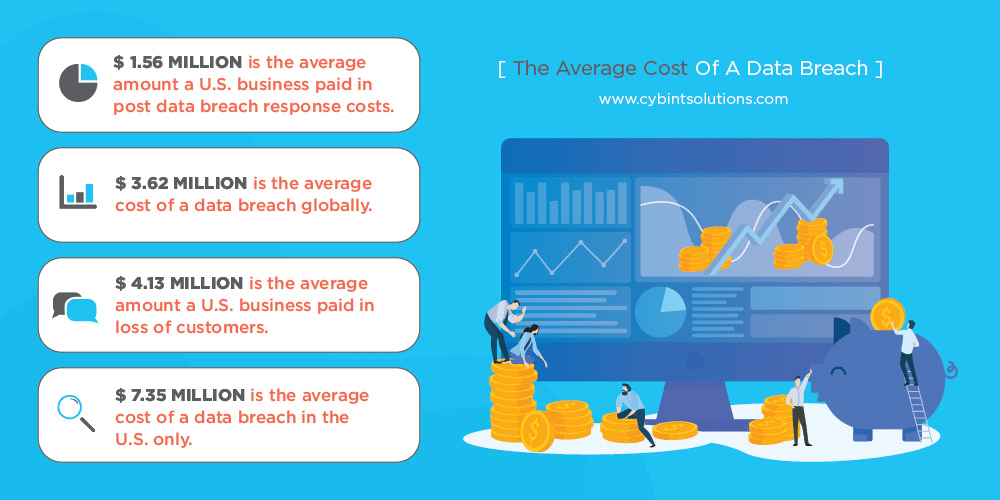
years, about 80 percent of beaches were caused by stolen passwords.
USE A LONG PASSWORD
The longer a password, the harder it is for hackers to figure out. Even if hackers use a fast computer to run through every possible combination of letters, numbers, and symbols, the longer the password, the more time it will take them to crack your account. And the longer it takes a hacker to do that, the more likely it is that they will give up on you and move to an easier target.
For instance, a simple eight-character password with all lowercase letters can be cracked in about five hours, where a password with 12 all lowercase characters would take slightly over 200 years. (Times are based on Tulane University's Brute Force Calculator)
USE A PHRASE AS YOUR PASSWORD
When I tell people they should have a long password, they naturally think about using a phrase or
passage of text they’ll remember. The problem is that hackers are well aware of this tactic and will also try using common or well-known quotes from literature, the bible, TV shows and movies to crack your password.
So while you might think “OpenThePodBayDoorsHal” maybe a good password because it long and has a mix of upper and lowercase letters, it’s also probably on the list of top five phases hackers will try because it's so obvious.
Your best bet here to use a nonsensical phrase or phrase that contains random words. Also do not use characters that are sequential on a keyboard, numbers in order or the widely used “qwerty” because those are also on the list of default passwords hackers will try to get into your account.
INCLUDE NUMBERS, SYMBOLS, AND MIXED-CASE LETTERS
By now we are all familiar with this as many sites require you to use symbols, numbers and letters in your passwords. One of the things I will do is come up with some phrase then substitute numbers or symbols for the following letters:
A =@ S = $ or 5 E =3 i =! or 1 O = zero
So if I decide to use the not-so-nonsensical phrase like: New Pair of Shirts
I can make it more secure by using the substitutions like I mentioned above to turn it into this: N3wP@1r0f$h1rt$
 |
If you use one of these as your password, you really need to change it immediately! (Source: zdnet.com) |
DO NOT REUSE PASSWORDS
If you only take away one thing from this post, remember this. Don’t use the same password on all your accounts!
Yes, I know it’s hard to remember just one password and now I’m telling you that you should have 20. But hackers know people are lazy and if they crack your e-mail or social media account password, the very next thing they are going to do is start trying to use that password on various banking and financial sites to see it if works.
I often council my employees at work to also change the passwords on their personal accounts whenever we detect that their work account password was compromised. I do this because even though our employees seldom use their work e-mail address as their username on personal sites, hackers are smart enough to try the password they cracked for Mary.Jones@MyCompany.org on accounts for mary.jones@gmail.com, mjones@gmail.com, etc.
USE A PASSWORD MANAGER
Okay, you’ve followed all my rules and created several strong passwords, but what good will they be if you can’t remember them when you need them?
The answer is simple. Stop trying to remember them and start using a password manger.
Password managers are small programs which you can install on your computer and phone which not only keep track of all your passwords, but also helps you create strong and different passwords for every site you visit. The beauty of using one is that you only have to remember a single, strong password and many can be unlocked by a finger print so you don’t even have to remember a password if you don’t want to.
Yes, some most modern browsers like Chrome and Firefox have features similar to this, but they are much less secure than dedicated password managers. So if your gmail account ever gets hacked, then all the passwords you have stored on your Google account will be exposed.
In my job, I use LastPass and have come to rely on it a lot. It works on both my phone and computer and integrates with Chrome pretty painlessly. I highly recommend it, but it’s not the only one out there. Here are a few others recommended by PC Magazine and CNET are worth checking out.
If you don’t want to spend money on one of these programs you can always do what Mrs. BlueScreamOfJeff does and turn one of those old-fashioned pocket phone/address books into an offline, physical password manager. Instead of using it to keep track of all her friends, family members and acquaintances, she uses each section to store the username and password for all her various accounts. For example on the “A” section pages, she has entries for her AOL, AirB&B and Applebees.com. Under the “B” section she has her Bank of America, Barnes and Noble and BBC.com login info.
Yes, this does go against “the rule” of not writing your passwords down, but it is OK to write them down as long as you store them in a secure location like a locked drawer when you’re not using it.
CHECK ON YOU PASSWORDS
Finally, you should periodically check to make sure your passwords are still secure and haven’t been hacked.
Sites like Have I Been Pwned?, BreachAlarm and Dehashed all let you check on whether your account has been compromised by a past data breach.
They are pretty simple to use. Just go to the page, enter your e-mail address and click the search button and these sites will then look through a list of accounts known to have been breached by hackers show you if your address was possibly compromised.
If it was, you should change that password immediately.
I know I’ve made it seem like creating and keeping your passwords safe is a lot of work. But like your mother always told you when you complained about having to eat your vegetables: You may not want to do it, but it's good for you.

Wednesday, November 25, 2020
Follow these online shopping tips to stay safe this holiday season

Cyber Monday is right around the corner and cybercriminals are gearing up to take advantage of unsuspecting people during the biggest online shopping day in the United States. It’s especially important this year, as many people will be foregoing their annual shopping trips to potentially crowded malls and stores to avoid the risks of contracting Covid 19.
As usual,
cybercrooks will try to lure you into giving up your personal information like
your credit card numbers, usernames and passwords, social security number and
even date of birth by doing the following:
- Creating fraudulent (but real-looking) web sites and
email messages
- Intercepting insecure transactions
- Targeting computers that are not running the latest
security patches, have minimal or no antivirus software on them or are
already infected with malware.
Fortunately,
with a little foreknowledge and some precaution, you can avoid many of these
cyber-threats. Think of these eight steps recommended by IT security
professionals, as the same type of common-sense things you’d do when shopping
in person: like locking the car and putting away your cash or credit card when
you’re done with your purchase.
Shop reliable websites and get there safely
If an offer
sounds too good to be true, it probably is. Don't be fooled by the lure of
great discounts from unfamiliar websites or companies you may not have heard
of. Most likely they are fake! Use the sites of retailers that you know
and trust, and get to their sites by directly typing a known, trusted
URL into the address bar instead of clicking on a link. Also look
closely at the names of the company and make sure they are who you think they
are. Many scammers may try to fool you by misspelling or using a look-alike
name of a better known company (for example Wallmart.com or Wal-Mart.com
instead of Walmart.com or Amazzon.com instead of Amazon.com)
Beware of seasonal scams
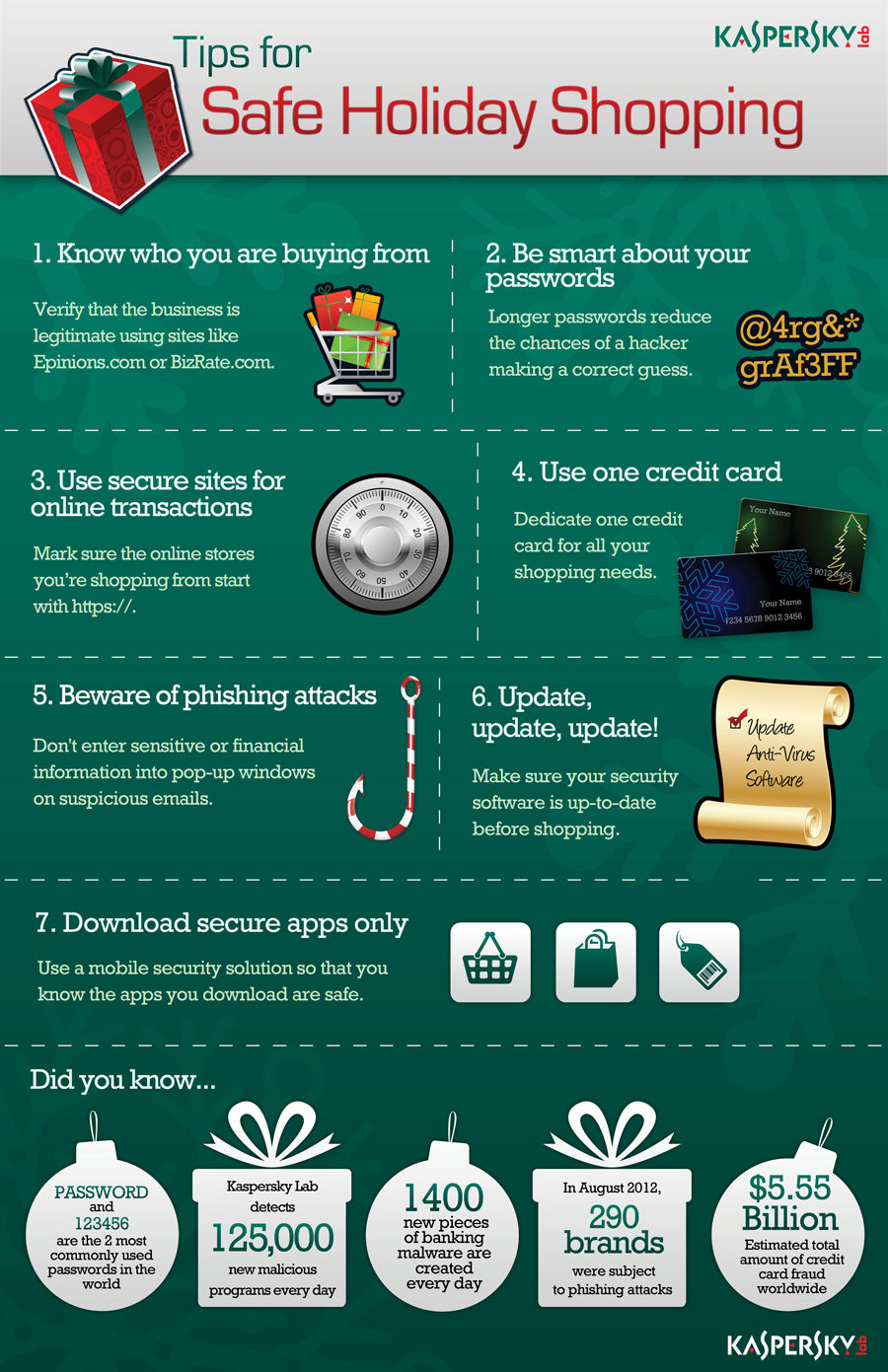
Fake package tracking emails, fake e-cards, fake charity donation scams, and emails requesting that you confirm purchase information are another common tactic cyber criminals use this time of year. Treat every message you get like this as suspicious and use known, trusted web address instead of clicking on the links in these messages. If you don’t know the URL of a charity or company look it up and confirm it across several websites. Which leads us to our next tip:
 |
| Graphic courtesy of Kaspersky Labs https://www.kaspersky.com/ |
Conduct research
When considering a new website or online company for your holiday purchases, read online reviews of it on other websites to see whether others have had issue with them. Never trust the reviews on the company’s web site itself. You can use sites like Yelp.com, Better Business Bureau and Consumer Reports to help you rate shopping sites, while the Federal Trade Commission recommends using BBB Wise Giving Alliance, Charity Navigator, CharityWatch, and GuideStar to check out charitable organizations .
And remember, if
a site looks suspicious, avoid it!
Think twice before clicking on links or opening
attachments
Even if links
appear to be from people you know, legitimate organizations, your favorite
retailers, or even your bank, messages can easily be faked. Use known,
trusted URLs instead of clicking on links. And only open known,
expected attachments. If in doubt, use a phone number you know to call your
bank, a store or your contact and find out if they really sent you that
attachment. I you can’t do that and still are in doubt, throw it out!
Make sure your device is patched and up-to-date
Before
shopping online at anytime of the year, you should always make sure your
device, apps, browser, and anti-virus/anti-malware software are patched and up
to date. Make sure automatic updates are turned on and periodically restart
your devices to ensure that updates are fully installed.
Protect your passwords
Never reveal
your passwords to anyone. Make them long, strong, unique, and use multi-factor
authentication (MFA) wherever possible. MFA requires you to have a second
device – most often a cell phone -- that a message can be sent to, to ensure
it’s really you trying to log into some website and not someone who may have
stolen your username or password.
Use different
passwords for different accounts and don’t use the same passwords you use at
home for work accounts and vise-versa. We IT pros know that doing that is
cumbersome and it’s hard to remember all those passwords, but that is what
cybercrooks count on! They know that if they crack one of your passwords they
will often be able to gain access to all your other accounts as well!
To help you
remember all those different passwords consider using a password manager such
as LastPass or RoboForm to store all
them. That way you only have to remember one master password. Better yet buy a
small notebook like an old-fashion address book and write down all your
usernames and password in that and always keep it in your desk at home.
And finally,
don’t let your apps and websites remember your passwords. If your device is
ever stolen or lost, whoever finds it will then have a record of all your
usernames and passwords.
Check your credit card and bank statements regularly
These are
often the first indicators that your account information or identity has been
stolen. If there is a discrepancy, report it immediately.
If you have
the option, turn on text alerts. Most banking apps and sites provide them and
allow you to create alerts for things like transactions over a specified dollar
amount or a daily text summary of your current balance. Getting these types of
alerts can help you to spot signs of unusual activity before thousands of
dollars are either charged or withdrawn from your accounts.
Lastly, check
your credit report at least annually. The
Federal Trade Commission provides information about getting free credit
reports and what to do if you find discrepancies.
Secure your home WiFi
To prevent
eavesdroppers and data thieves, ensure that you have a strong passphrase (12
characters or more with your wireless network set to WPA-2). Change your
network’s name (SSID) from the default to something that does not obviously
belong to you. Limit who has administrative access to your home network.
Finally, log into your wireless router periodically to check for software
updates (many home routers don’t auto-update).
Get savvy
about WiFi hotspots and public computers. Treat all WiFi hotspots and public
computers as compromised, even if they appear to be safe. Limit the type of
business you conduct on them, including logging in to key accounts, such as
email and banking, and shopping. And set your devices to “ask” before joining
new wireless networks so you don’t unknowingly connect to an insecure or
fraudulent hot spot.
Following all
these tips may sound like a lot to remember, but they’re really no different
than the precautions you’d usually take when planning a shopping trip to the
mall during the busy holiday season. And they are certainly easier than trying
to find that coveted parking spot close to the entrance in a crowded lot!