
Friday, April 30, 2021
Cybersecurity: Pass the word about good passwords
 |
| Comic courtesy of xkcd.com. You can see the full comic here |
 |
| SOURCE: cybintsolutions.com |
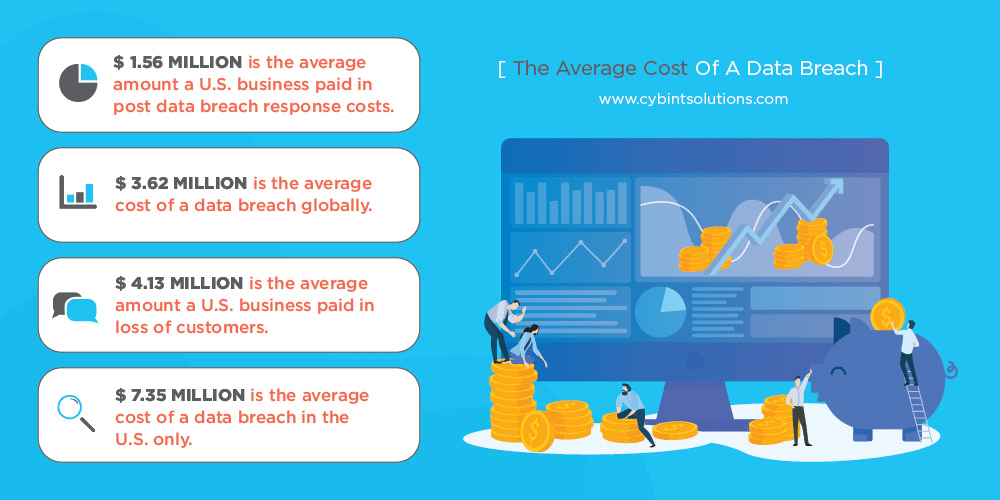
years, about 80 percent of beaches were caused by stolen passwords.
USE A LONG PASSWORD
The longer a password, the harder it is for hackers to figure out. Even if hackers use a fast computer to run through every possible combination of letters, numbers, and symbols, the longer the password, the more time it will take them to crack your account. And the longer it takes a hacker to do that, the more likely it is that they will give up on you and move to an easier target.
For instance, a simple eight-character password with all lowercase letters can be cracked in about five hours, where a password with 12 all lowercase characters would take slightly over 200 years. (Times are based on Tulane University's Brute Force Calculator)
USE A PHRASE AS YOUR PASSWORD
When I tell people they should have a long password, they naturally think about using a phrase or
passage of text they’ll remember. The problem is that hackers are well aware of this tactic and will also try using common or well-known quotes from literature, the bible, TV shows and movies to crack your password.
So while you might think “OpenThePodBayDoorsHal” maybe a good password because it long and has a mix of upper and lowercase letters, it’s also probably on the list of top five phases hackers will try because it's so obvious.
Your best bet here to use a nonsensical phrase or phrase that contains random words. Also do not use characters that are sequential on a keyboard, numbers in order or the widely used “qwerty” because those are also on the list of default passwords hackers will try to get into your account.
INCLUDE NUMBERS, SYMBOLS, AND MIXED-CASE LETTERS
By now we are all familiar with this as many sites require you to use symbols, numbers and letters in your passwords. One of the things I will do is come up with some phrase then substitute numbers or symbols for the following letters:
A =@ S = $ or 5 E =3 i =! or 1 O = zero
So if I decide to use the not-so-nonsensical phrase like: New Pair of Shirts
I can make it more secure by using the substitutions like I mentioned above to turn it into this: N3wP@1r0f$h1rt$
 |
If you use one of these as your password, you really need to change it immediately! (Source: zdnet.com) |
DO NOT REUSE PASSWORDS
If you only take away one thing from this post, remember this. Don’t use the same password on all your accounts!
Yes, I know it’s hard to remember just one password and now I’m telling you that you should have 20. But hackers know people are lazy and if they crack your e-mail or social media account password, the very next thing they are going to do is start trying to use that password on various banking and financial sites to see it if works.
I often council my employees at work to also change the passwords on their personal accounts whenever we detect that their work account password was compromised. I do this because even though our employees seldom use their work e-mail address as their username on personal sites, hackers are smart enough to try the password they cracked for Mary.Jones@MyCompany.org on accounts for mary.jones@gmail.com, mjones@gmail.com, etc.
USE A PASSWORD MANAGER
Okay, you’ve followed all my rules and created several strong passwords, but what good will they be if you can’t remember them when you need them?
The answer is simple. Stop trying to remember them and start using a password manger.
Password managers are small programs which you can install on your computer and phone which not only keep track of all your passwords, but also helps you create strong and different passwords for every site you visit. The beauty of using one is that you only have to remember a single, strong password and many can be unlocked by a finger print so you don’t even have to remember a password if you don’t want to.
Yes, some most modern browsers like Chrome and Firefox have features similar to this, but they are much less secure than dedicated password managers. So if your gmail account ever gets hacked, then all the passwords you have stored on your Google account will be exposed.
In my job, I use LastPass and have come to rely on it a lot. It works on both my phone and computer and integrates with Chrome pretty painlessly. I highly recommend it, but it’s not the only one out there. Here are a few others recommended by PC Magazine and CNET are worth checking out.
If you don’t want to spend money on one of these programs you can always do what Mrs. BlueScreamOfJeff does and turn one of those old-fashioned pocket phone/address books into an offline, physical password manager. Instead of using it to keep track of all her friends, family members and acquaintances, she uses each section to store the username and password for all her various accounts. For example on the “A” section pages, she has entries for her AOL, AirB&B and Applebees.com. Under the “B” section she has her Bank of America, Barnes and Noble and BBC.com login info.
Yes, this does go against “the rule” of not writing your passwords down, but it is OK to write them down as long as you store them in a secure location like a locked drawer when you’re not using it.
CHECK ON YOU PASSWORDS
Finally, you should periodically check to make sure your passwords are still secure and haven’t been hacked.
Sites like Have I Been Pwned?, BreachAlarm and Dehashed all let you check on whether your account has been compromised by a past data breach.
They are pretty simple to use. Just go to the page, enter your e-mail address and click the search button and these sites will then look through a list of accounts known to have been breached by hackers show you if your address was possibly compromised.
If it was, you should change that password immediately.
I know I’ve made it seem like creating and keeping your passwords safe is a lot of work. But like your mother always told you when you complained about having to eat your vegetables: You may not want to do it, but it's good for you.

Wednesday, March 31, 2021
Cybersecurity: Is there something phishy going on in your inbox?
 |
| SOURCE: Jeffrey L. Price, 2020 |
It’s because fish can’t resist them, and it seems we humans also have this same flaw. Send someone a flashy message promising them some reward or a vaguely worded threat and we just can’t resist clicking on the link or attachment in that message to see what it is.
Cybercriminals know this and depend on your trust and curiosity to make their scams work. And just like that poor trout who goes to investigate that shiny thing floating around in the water, it doesn’t end well.
So how do you avoid becoming some cyber-fisherman’s catch of the day?
The answer is deceptively easy. When it comes to e-mails -- and even text messages – trust nobody. Assume every message you get is fake until you can confirm it’s not.
And how do you go about confirming a message isn’t fake?
By following some simple precautions I outline below. While this list isn’t exhaustive and doesn’t guarantee you will never be fooled, you will be surprised how often it can save you from being hooked.
Skepticism is your best defense
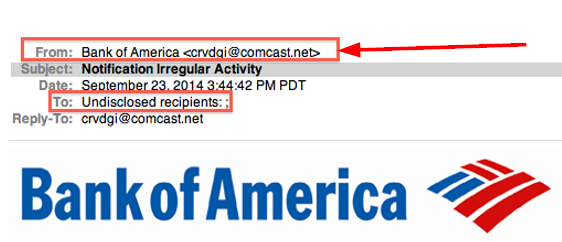
Look closely at the display name and email address
Review the salutation

Be warry of urgent or threatening language
Guard your confidential information as if your life depended on it
Think before you click
 |
Note the link in the body says one thing, but when you hover over it, the real link shows a different address! |
hover your mouse over the link. If the link address looks weird, DON’T click on it. If you’re skeptical about the link, call an IT pro to have them check it out. If you don’t have a favorite IT person you can bug, then look up the business’ contact information via a google search or go old-school and use a phone book, and call the company and ask them about the message.
Don’t click attachments either
Texts messages aren’t any safer
Sunday, February 28, 2021
Cybersecurity speak: Is it all geek to you?

MALWARE
RANSOMWARE
Ransoms can be as “small” as $100 or range into the
millions. It’s often demanded in bitcoin, a type of virtual or electronic
currency that is hard to trace, and there is no guarantee that even if you pay
the ransom, the hostage taker will give you the key to unlock your data.
Most people have probably heard about the recent ransomware
attacks on big hospitals and municipal governments, but do not let that fool
you into thinking that cybercriminals only target big institutions with deep
pockets.
They don’t.
PHISHING
 |
| SOURCE: Jeffrey L. Price, 2020 |
your computer or lockup your data. It’s to trick you into willingly reveal your sensitive information or data to an attacker. Attackers will do this by trying to impersonate someone you know or an institution you trust to not only get you to reveal your usernames, passwords and/or financial information, but also trick you into sending money to some fake account they have control of. Phishers also use these types of attacks to gather other background information on you such as your birthdate, social security number, previous employers, salary, etc. so they can use that information to open fake credit accounts in your name.
SPEAR-PISHING
SMISHING
VISHING
SOCIAL ENGINEERING
AGE DOESN’T MATTER
 |
| SOURCE: Proofpoint 2020 State of the Phish report |
and older folks, you’d be dead wrong. “Digital natives” – the generation who has never known a world without all this technology – aren’t immune from falling victim to cybercrime.
2FA/MFA
Sunday, January 31, 2021
When it comes to Cybersecurity, humans are the weakest link

working correctly, but also to make sure no one’s accessing them who shouldn’t be.
It may sound like a simple task, but with over 6,000 employees scattered across 70-plus offices in 10 states, it’s not as easy as it sounds. Especially the cybersecurity aspect of it.
Yes, we have firewalls and other gadgets and software watching our systems so I’m not the only guard at the virtual castle gate telling every visitor: “Halt! Who goes there?” But as 2020 showed us in perhaps the most dramatic way possible, our collective workplaces are no longer a physical place that can be defended by virtual fortifications.
Nor are they even like the Iron Ring of castles that King Edward 1st of England built to subdue Wales back in medieval times.
In 2021, the workplace can be anywhere and it can change not only from day-to-day, but even hour-to-hour. The old way of constructing permanent, impenetrable walls around our workplace computer systems is about as useful as Edward’s quaint old castles against a modern army using artillery firing high-explosive rounds.
The key to cybersecurity these days is to protect the data no matter where it is. So instead of focusing on building bigger and better walls, we should instead concentrate on protecting the messengers who carry the king’s missives between his castles and cities.
IT folks like me are already doing this, but the more I learn about how to protect these messengers from the brigands and bandits who lay in wait in the dark alleys off the information superhighway, the more I realize that just throwing more technology at the problem is NOT the answer. In my opinion, it may actually make matters worse.
Adding complexity to any system, means there are more things that can go wrong, and as we’ve learned time and again, hackers are adept at exploiting the tiniest of flaws they find in any system. Adding complexity also makes it harder for regular folks to use and understand it. Human nature being what it is, means that people will then try to find a “quicker and easier” and way to get their work done, often bypassing the thing that’s meant to keep them safe.
And that’s really the biggest challenge in Cybersecurity these days.
The weakest link has – and always will be – the human element.
The average person does not know (or really care) about how technology works. Most only want to know which buttons to press to get a particular task done. The rest to them is magic.
And therein lies the problem.
IT professionals like me need to help to demystify technology and help regular folks understand how the devices they have come to rely on work. I’m not saying the average Joe needs to know how to debug a kernel panic, install an operating system or even swap out a memory module before using a cell phone, sending a text message or ordering pizza or toilet paper online. However, they should be taught how to apply the same basic safety tips and skepticism they use in the real world to the virtual one so they can keep themselves safe.
I know this seems rather obvious, but then again, so does driving a car. The gas pedal makes it go, the brake pedal makes it stop and the steering wheel lets you make turns.
Every kid knows this.
Yet we’d never give car keys to a teenager on their 16th birthday and let them figure out the rest on their own. Instead, we make them learn the rules of the road from a (hopefully) more experienced driver.
And that’s what I want to do over the next 12 months with a majority of my blog posts. I want to help folks learn how to detect possible scams and view every online transaction with the same degree of suspicion they’d have if someone claiming to know them came up to them on the street and asked them for their house or car keys.
I’m hoping this can be an open and interactive discussion, so please feel free to ask any questions, no matter how basic they seem, in the comments below and I’ll do my best to answer them for you either in the comments or in the next month’s post.
Thursday, December 31, 2020
2020 hindsight

As this very unusual year draws to an end, I thought it would be a good idea to look back at the last 12 months and see what, if anything, we have learned.
The sad truth is I don’t think we’ve learned a thing.
I still hear people who think that the Coronavirus is no worse than the seasonal flu despite the fact that as of this writing, 334,029 people in the United States have died of it since Jan 21, 2020. In contrast, only 22,000 people died of the normal flu in 2019-2020 flu season. .
Yet despite all the evidence around them -- like over-flowing hospitals and a healthcare system on the brink of collapse -- I still see people asserting their “rights” not to wear masks or protesting government restrictions limiting large gatherings. To make matters worse, unscrupulous politicians are using this crisis not bring the country together, but to separate us into small tribes as if this were some sort of game.
This has left me feeling frustrated on a number of levels and makes me feel like the year 2020 is going to be the year that began the decline and fall of one of the greatest countries on Earth.

The United States was built on all of us being one, unified people. It’s right there in the pledge of allegiance we all recited as children: “one nation under G-d, indivisible, with liberty and justice for all.” Yet politicians seem bound and determined to divide us into small groups: red and blue, Democrat or Republican, liberal or conservative, snowflake or fascist.
For G-d’s sake, didn’t we fight a war over this 150 years ago? Does no one remember that famous Lincoln quote: "A house divided against itself cannot stand."?
The United States didn’t expand across an entire continent, help turn the tide in the world’s first mechanized war, survive a great depression, defeat fascist regimes bent on world domination and win a cold war, by turning against each other and fighting among ourselves.
On the contrary, we put on our big-boy pants, put aside our differences, and came together to fight whatever the current threat was. But today there seems no interest in this. All people seem to be interested in today is their own good. Screw the other guy, as long as they get what’s good for them, they don’t care what happens to anyone else.
This has never become more clear to me than the people who still refuse to mask up. “It violates MY rights,” they say. “I shouldn’t be forced to wear a mask.”
And they are right. They do have a right NOT to wear that mask. But to paraphrase the late, great StanLee, “With our great First Amendment rights, comes great responsibility” and while some people are all about defending those rights, they forget about their responsibilities to their fellow citizens that comes with them.

Look, our rights do NOT let us do anything we want. The U.S. Constitution guarantees us to the right of free speech, but you can be damn sure that if I yell “Fire!” in a crowded theater (remember them?) that you’d be arrested for causing a stampede if not a few deaths.
Likewise, there is no law that says you have to wear any clothing if you don’t want to. But you still can’t go out in public naked, even if you find clothing gives you a rash or prevents your skin from breathing. You’d be arrested for public indecency. And what about my right to go around shirtless with nothing on my feet? I should be able to walk into any restaurant and get something to eat, right? So where is all the outrage over those “No shirts, no shoes, no service signs” I see posted on almost every eatery’s door?
Then, on top of all this disregard for our fellow citizens, we’ve suddenly turned our collective backs on another thing that allowed this country to excel: our reverence for science and the opinion of experts.
Our history is chockful full scientists, doctors and engineers whose inventions and discoveries helped change the world: Benjamin Franklin, Samuel Morse, Eli Whitney, George Washington Carver, Thomas Edison, George Eastman, Walter Reed, Philo Farnsworth, Robert Goddard, Benjamin Spock, Jonas Salk. Then there are others like Albert Einstein and Nikola Tesla who came to this country and became citizens because of the value our country placed on science.
But I’m afraid that wouldn’t happen today. If Einstein and Tesla were thinking of about coming to our country now, they’d probably be turned off by self-proclaimed, armchair experts who think that because they saw something on Facebook or spent 10 minutes Googling something, that they suddenly know more about science and engineering than they do.
It’s sad because I always thought that we were better than this. I always believed each new year would bring us one step closer to the shiny utopian future portrayed in “Star Trek” and not toward the bleakness of the Empire’s rule in the “Star Wars” universe.
But if 2020 has taught me anything, it’s that maybe it’s time to retire those rose-colored glasses and optimistic attitude I’ve always viewed the future with and start looking at it with a more skeptical eye.
I hope 2021 will change this attitude, but at the moment, I’m not counting on it.
Wednesday, November 25, 2020
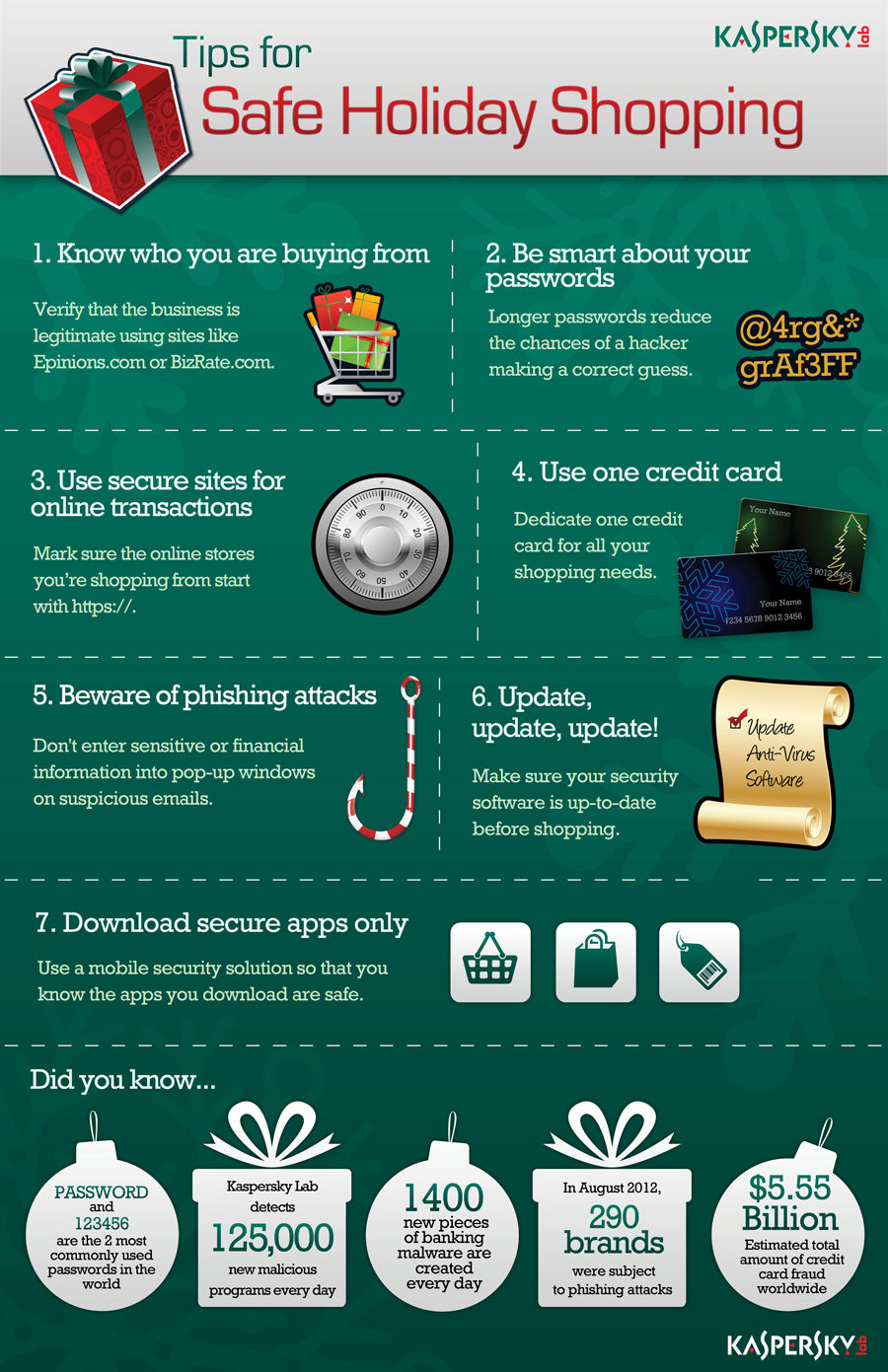
Follow these online shopping tips to stay safe this holiday season

Cyber Monday is right around the corner and cybercriminals are gearing up to take advantage of unsuspecting people during the biggest online shopping day in the United States. It’s especially important this year, as many people will be foregoing their annual shopping trips to potentially crowded malls and stores to avoid the risks of contracting Covid 19.
As usual,
cybercrooks will try to lure you into giving up your personal information like
your credit card numbers, usernames and passwords, social security number and
even date of birth by doing the following:
- Creating fraudulent (but real-looking) web sites and
email messages
- Intercepting insecure transactions
- Targeting computers that are not running the latest
security patches, have minimal or no antivirus software on them or are
already infected with malware.
Fortunately,
with a little foreknowledge and some precaution, you can avoid many of these
cyber-threats. Think of these eight steps recommended by IT security
professionals, as the same type of common-sense things you’d do when shopping
in person: like locking the car and putting away your cash or credit card when
you’re done with your purchase.
Shop reliable websites and get there safely
If an offer
sounds too good to be true, it probably is. Don't be fooled by the lure of
great discounts from unfamiliar websites or companies you may not have heard
of. Most likely they are fake! Use the sites of retailers that you know
and trust, and get to their sites by directly typing a known, trusted
URL into the address bar instead of clicking on a link. Also look
closely at the names of the company and make sure they are who you think they
are. Many scammers may try to fool you by misspelling or using a look-alike
name of a better known company (for example Wallmart.com or Wal-Mart.com
instead of Walmart.com or Amazzon.com instead of Amazon.com)
Beware of seasonal scams
Fake package tracking emails, fake e-cards, fake charity donation scams, and emails requesting that you confirm purchase information are another common tactic cyber criminals use this time of year. Treat every message you get like this as suspicious and use known, trusted web address instead of clicking on the links in these messages. If you don’t know the URL of a charity or company look it up and confirm it across several websites. Which leads us to our next tip:
 |
| Graphic courtesy of Kaspersky Labs https://www.kaspersky.com/ |
Conduct research
When considering a new website or online company for your holiday purchases, read online reviews of it on other websites to see whether others have had issue with them. Never trust the reviews on the company’s web site itself. You can use sites like Yelp.com, Better Business Bureau and Consumer Reports to help you rate shopping sites, while the Federal Trade Commission recommends using BBB Wise Giving Alliance, Charity Navigator, CharityWatch, and GuideStar to check out charitable organizations .
And remember, if
a site looks suspicious, avoid it!
Think twice before clicking on links or opening
attachments
Even if links
appear to be from people you know, legitimate organizations, your favorite
retailers, or even your bank, messages can easily be faked. Use known,
trusted URLs instead of clicking on links. And only open known,
expected attachments. If in doubt, use a phone number you know to call your
bank, a store or your contact and find out if they really sent you that
attachment. I you can’t do that and still are in doubt, throw it out!
Make sure your device is patched and up-to-date
Before
shopping online at anytime of the year, you should always make sure your
device, apps, browser, and anti-virus/anti-malware software are patched and up
to date. Make sure automatic updates are turned on and periodically restart
your devices to ensure that updates are fully installed.
Protect your passwords
Never reveal
your passwords to anyone. Make them long, strong, unique, and use multi-factor
authentication (MFA) wherever possible. MFA requires you to have a second
device – most often a cell phone -- that a message can be sent to, to ensure
it’s really you trying to log into some website and not someone who may have
stolen your username or password.
Use different
passwords for different accounts and don’t use the same passwords you use at
home for work accounts and vise-versa. We IT pros know that doing that is
cumbersome and it’s hard to remember all those passwords, but that is what
cybercrooks count on! They know that if they crack one of your passwords they
will often be able to gain access to all your other accounts as well!
To help you
remember all those different passwords consider using a password manager such
as LastPass or RoboForm to store all
them. That way you only have to remember one master password. Better yet buy a
small notebook like an old-fashion address book and write down all your
usernames and password in that and always keep it in your desk at home.
And finally,
don’t let your apps and websites remember your passwords. If your device is
ever stolen or lost, whoever finds it will then have a record of all your
usernames and passwords.
Check your credit card and bank statements regularly
These are
often the first indicators that your account information or identity has been
stolen. If there is a discrepancy, report it immediately.
If you have
the option, turn on text alerts. Most banking apps and sites provide them and
allow you to create alerts for things like transactions over a specified dollar
amount or a daily text summary of your current balance. Getting these types of
alerts can help you to spot signs of unusual activity before thousands of
dollars are either charged or withdrawn from your accounts.
Lastly, check
your credit report at least annually. The
Federal Trade Commission provides information about getting free credit
reports and what to do if you find discrepancies.
Secure your home WiFi
To prevent
eavesdroppers and data thieves, ensure that you have a strong passphrase (12
characters or more with your wireless network set to WPA-2). Change your
network’s name (SSID) from the default to something that does not obviously
belong to you. Limit who has administrative access to your home network.
Finally, log into your wireless router periodically to check for software
updates (many home routers don’t auto-update).
Get savvy
about WiFi hotspots and public computers. Treat all WiFi hotspots and public
computers as compromised, even if they appear to be safe. Limit the type of
business you conduct on them, including logging in to key accounts, such as
email and banking, and shopping. And set your devices to “ask” before joining
new wireless networks so you don’t unknowingly connect to an insecure or
fraudulent hot spot.
Following all
these tips may sound like a lot to remember, but they’re really no different
than the precautions you’d usually take when planning a shopping trip to the
mall during the busy holiday season. And they are certainly easier than trying
to find that coveted parking spot close to the entrance in a crowded lot!
Saturday, October 31, 2020
Who says woodworking and IT don’t mix?
 |
| My server rack as planned (left) and as built (right) after finally assembly in my shop before I moved it into my office. |
A while back I wrote about how IT and woodworking are similar, as they both are really about problem solving.
Yet whenever I assert this, I still draw skeptical looks.
People just cannot see how turning something as tangible as a few boards of wood into a piece of furniture is anything like manipulating a bunch of ones and zeros that only exist in cyberspace.
Well, this month, I’ve finally provided a real-world example of how IT and woodworking can mix by creating my own network/server rack.
What’s a network/server rack you ask and why did I build it?
Well, simply put, a network/server rack is a place were IT professionals like me can hang and organize the assorted bits and pieces of equipment that allow computers to talk to each other
and access files and applications that are not directly loaded on them. I decided I needed a rack now after I acquired and fixed an Uninterruptable Power Supply unit that was meant to hang on such a rack.
I already had a small battery backup unit – or UPS for short – on the floor behind my desk, but its battery had long since died and even when new, it wouldn’t power my gear for much longer that 10 minutes if the power went out.
This rack mounted UPS would power almost all of my gear for about an hour and the cost of replacing its battery wasn’t much more than replacing the battery in my smaller unit, so it was a no-brainer as to which one I should fix.
 |
| This was only some of the networking and storage gear that was scattered around my office that I was able to consolidate into my rack |
I could have just let it sit on top of a filing cabinet with my PCs stacked on top of it, but that seemed kind of junky. Plus, my other networking equipment was scattered all around my home office and for years I’ve been telling myself I really need put it all in one place and organize it better. So, this just seemed like the perfect opportunity to take care of two problems at once.
The first thing I did was to go online and see how much one of these network racks cost, and I was shocked by their price tags. Even the simplest two-post models were well over $150!
Admittedly, I’m a cheapskate, but that seemed pretty excessive to me for what is essentially two pieces of perforated angle iron held in a vertical position and connected at the base. I knew I could get that angle iron for about $30 at a big-box hardware store and couldn’t see why I needed to spend $120 more for one that was already put together.
After about 10 minutes of additional web research, I not only found that making your own DIY rack was not only feasible but really easy. I’d even come up with a design that would make it look more furniture-like and less industrial-looking.
 |
| Two views of my home-made rack, all set up and in place in my office. The aim was to have it look as much like a piece of furniture as it could while still serving its function holding all my tech gear. Proof that IT and woodworking do mix! |
The next step was to translate that idea into a physical set of plans. I’ve been doing woodworking long enough to know that the plans I create in my head, don’t always work out the way I think they will in the real word. Inevitably, I miss some small detail that winds up throwing off the entire project and I then need to spend hours figuring out a work-around to get myself back on track.
That’s why I have started using SketchUp.
This free, 3D-modeling program lets me build the project virtually almost in the same way I’d build it out in my shop. This way I can see any problems that may arise and fix them before I start cutting any wood.
And sure enough, while coming up with the virtual version you see here, I did find one of those small hiccups. But unlike hours it would have taken me to fix in the shop, I corrected the plan with just a few clicks of my mouse, so that when I did get to the shop there were no delays.
The one thing my plans did not show, however, was how sturdy and rigid the final product would be. That’s why the finished product looks a bit different from the plan. These are the kind of unexpected things I don’t mind, because it actually saved me some time in the shop!
Once I had finalized the plan on the computer and ordered the hardware online (I found a few “genuine” rack parts online that were even cheaper than the angle iron I was going to use from the big-box store), I ran out and got two, eight-foot 2x4s and started my build.
I was able to cut and assemble all the parts in a single day. Staining the wood to match my office future took about another week, but if I’d decided to paint it black, I could have finished this project in a single weekend.
So here it is, proof for all those remaining doubters that you CAN combine woodworking and IT in a very practical way.
Now, I’ve just got to figure out how to build that wooden computer case I’ve always wanted….