
Tuesday, August 31, 2021
Never Can Say Goodbye

While the start of a novel of a thousand pages begins with the typing of a single word, it often ends with both a bang and a whimper.
The bang, of course, comes from both the climax of a hopefully exciting plot/character arch and the elation of finally finishing a long-awaited masterpiece, while the whimper comes from having to let go of a work you’ve poured so much time and effort into.
I discovered this odd dichotomy earlier this month when I finally finished writing a story I’ve been working on for almost 40 years. It’s taken many forms over the past four decades and while the plot and setting have changed many times, the main characters have mostly remained the same.
They’ve been with me for so long that they feel like real, flesh-and-blood people who have seen me though all the major changes in my life. They were my constant companions, with me day and night, whispering their secrets into my ears and keeping mine. And now that their story has concluded – at least for now – I feel like I’m leaving them behind.
Only I don’t want them to go.
I know. There is still the long and arduous editing process where I’ll need to do some rewrites to trim the bloat, streamline the plot and fix any continuity errors caused by writing the story out of sequence over such a long period of time. And then there are the enviable sequels that are already swirling around in my head. But it’s still kind of strange and sad knowing I’ve finished with them and their main story for now.
At the moment, I’m not sure how I’m supposed to spend my future summer vacations. I used to spend them in the pool, in my floaty-chair, pad of paper and pencil in hand scribbling away to finish this story. It was my way of removing myself from any distractions or temptation to do something else and let me concentrate on just writing. Every year, I’d tell myself, “This is the summer I’m going to finish it!” and inevitably I’d struggle to overcome writer’s block or my imaginary friends would stop whispering in my ears and my progress would slow to a crawl.
That seemed to change last year with the pandemic. Suddenly, they couldn’t shut up and I spent both this and last summer just trying to keep up with them. Not everything they told me turned out to be true, because I needed to rewrite some sections two or three times before they told me I’d gotten it write… er… I mean right. But at least they were filling in the remaining holes in their story. I guess they’d gotten tired of being locked down too.
So again, I spent every hour I could this summer either in my pool or on a hammock swing in my backyard away from all distractions, dutifully recording what my imaginary friends were telling me before they stopped talking again. Then, before I knew, it I was done.
At first, I couldn’t believe it. Part me of never thought I’d actually finish. I was ecstatic!
Then came the letdown, depression and listlessness. For a week or two after that, I didn’t have the motivation to type those last hand-written sections into the computer to complete the initial draft or do anything even remotely creative.
Fortunately, the feeling has faded and last weekend I began typing in those final sections, so that by the end of Labor Day weekend, I’m pretty sure I’ll have that initial draft assembled and truly know if that single word did indeed begin a journey of a thousand pages.

Saturday, July 31, 2021
Cybersecurity wrap up
For the last six months, I've been writing about how to keep yourself safe online. I concluded the series -- for now -- last month, and for your convenience, I'm creating a index of all those articles here so you have one-handy place to reference all of them.
When it comes to Cybersecurity, humans are the weakest linkJust trying to using technology to protect data won't keep people safe from cyber criminals. In fact, it may actually make matters worse. Adding complexity to existing security systems will only make it harder for regular folks to use and understand it. The key to keeping people safe is to change their behavior.
Cybersecurity speak: Is it all geek to you?
When IT folks start talking about cybersecurity we often use many terms people don't understand. So in this article, I explain what much of that jargon means.
Is there something phishy going on in your inbox?
In this article, I show you how you can identify scam e-mails that enter your inbox. And the key to protecting yourself is deceptively easy – trust nobody. Assume every message you get is fake until you can confirm it’s not.
Pass the word about good passwords
You hear IT folks saying it all the time. You need to create complex passwords and should have a different one for every account you have. The problem is remembering them all. This article will give tips on how to do that.
2FA or not 2FA? That’s the question…
No matter how unguessable you think your password is or how careful you are about avoiding online scams, your credentials could still be stolen by hackers who target the companies who store those passwords. That’s why you need to further secure your important accounts by using something called Two Factor Authentication (2FA) or Multi-Factor Authentication (MFA).
Focus on the people, not the technology
IT folks need to get users to think about cybersecurity in same way they think about their safety and security in the real world. Because when it comes down to it, keeping safe online is nothing more than following the same common-sense safety procedures we were all taught as kids and no longer even have to think about.
Wednesday, June 30, 2021
Cybersecurity: Focus on the people, not the technology

Over the last few months, I’ve written a lot about cybersecurity, yet many of you may have noticed that I didn’t talk a lot about technological defenses such as software that you can install on your devices to detect and block viruses and malware, or things like VPNs, which can help anonymize you so hackers – or even the companies you do regular business with – can’t track you across the web.
Neither did I talk about rules you could set up to prevent spam and fraudulent e-mails from reaching your inbox or browser add-ins you could install to block you from going to malicious websites which try to trick you into revealing your personal information or downloading spyware.
It’s not that these things aren’t important – because they are – but I’ve noticed that when you start taking about stuff like that, a lot of people’s eyes start to glaze over. It all sounds very complicated, and many people don’t understand it or lack the confidence or competence to set it up themselves.
Another reason I avoided talking about these things is because having all the best security technology in the world doesn’t guarantee you won’t become a victim of cybercrime.
Just ask the folks who run the Colonial Pipeline and JBS Foods. Both these big companies have a
department full of IT folks equipped with some pretty sophisticated equipment, yet both got hit with ransomware attacks in May and both had to pay a huge amount of money to get their data back.

Look, I’m not laying the blame solely on intentionally careless users. Most folks I know try to be careful, but either don’t understand why they need to follow the guideless their IT folks say they should or find all the procedures and checklists too complicated or hard to remember. And frankly this is the fault of us IT folks for making things way more complicated than they need to be.
Instead of concentrating on the technical aspects of keeping people safe, we IT folks need to take a more people-centric approach to cybersecurity. We need to make its concepts more tangible to what people do in the real word without really thinking about it.
For example, if you asked most folks if they would leave the key to their house under the door mat where every burglar in the world knows to look for it, or ask them if they’d leave their wallet or purse unattended in a public place or if they’d give a complete stranger their credit card, social security number or bank account number, I’m sure 99.999999 percent of them would say no.
It’s just common-sense safety procedures we were all taught as kids and don’t think twice about. We just do it without thinking because it’s so ingrained in us.
And that should be the goal of every IT professional. Get users to think about cybersecurity in same way they think about their safety and security in the real world.
For example, no one would secure their valuables with a padlock which only had a one-digit combination. Anyone could open that lock in seconds by just trying every number from 0 to 9 until they got the right one. Furthermore, they wouldn’t use that same one-digit combination on every lockbox they owned. That would be crazy, right?
Yet in 2020, over 2 million people used “123456” as their password!
But having so many passwords is hard to remember, they’ll say. To which I’d answer: So, it is remembering what all the different keys on your keyring are for, but you don’t have a single key that opens all the doors in your house, car, office, or deposit box do you? It would be too dangerous if you lost it.
The key (if you’ll excuse the analogy) is to get people to see that cybersecurity isn’t some new nebulous thing they need to master but just an extension of their everyday, real-word safety habits that they’ve been practicing all their lives. There’s no need to master any new skills. They just need to apply the skills they already have to the virtual world as well as the physical.
I really believe that this people-centric approach to online security is vastly superior to any technological solution we could come up with. If we can get people to view that fake e-mail from a bank with the same suspicion they’d give to a stranger who just knocked on their door and claimed to be representative from their bank, then there would be little need for all that super-complicated technology.
I hope that this series has helped you to better understand this and see that keeping yourself safe out there in cyberspace isn’t as complicated as you might have thought.
Saturday, May 29, 2021
Cybersecurity: 2FA or not 2FA? That’s the question…
 |
| Graphic courtesy of Marshall University IT Department |
Okay, you’ve learned how to spot fraudulent e-mail and text messages and have followed my advice about creating different, strong passwords for each of your online accounts. Now you can relax, knowing all your important information is safe and secure, right?
Wrong!
No matter how unguessable you think your password is or how careful you are about avoiding online scams, your credentials could still be stolen by hackers who target the companies who store those passwords. That’s why you need to further secure your important accounts by using something called Two Factor Authentication (2FA) or Multi-Factor Authentication (MFA).
Doing this creates an extra step to prove your identity when you go to login to a website, device or application, by having you enter a second piece of information completely separate from your username or password.
Yes, this extra step may be inconvenient, but it provides an extra layer of security because the more time and hoops you make a hacker jump through, the more likely it is that he or she will just give up and move on to another victim whose account is easier to crack.

stop every attack. Frankly, that’s not possible. It should be to put so may barriers up between you and the hackers, that it’s simply not worth their time to victimize you.
So how exactly does all this work? And isn’t that second piece of information just as vulnerable to being stolen as a password?
No.
You see the way 2FA/MFA typically works is that the site or device you are trying to log in to either sends that second piece of information to another device in your possession or prompts you to enter information from an app you have on that second device. Either way, that information – usually a six-digit code – constantly changes and is only good for a few minutes. So even if a hacker manages to get ahold of the code, they can’t keep using it over and over again to gain your account like they could a stolen password.
Like all things, this method is not fool-proof, and there are ways around it even without direct access to your second device. But those methods are harder to do and hackers may decide it’s not worth the time and trouble and move on to someone else.
Currently, most people usually use their cell phone as that secondary device to setup multi-factor authentication, and that’s what I’d recommend doing if you have one. It’s more secure than having messages sent to an e-mail account which is easier to hack than a device you almost always have with you anyway.
If you decide to use your cell phone for this, I’d also recommend registering another mobile device -- if you can -- as a backup. This way if you lose your phone, you can have your cell phone provider help you remotely wipe it, disabling its ability to do MFA, yet still be able to authenticate with the other device.
There are several different ways MFA works. Here are the five most common ones:
‘Push’ Notification to a Mobile Device
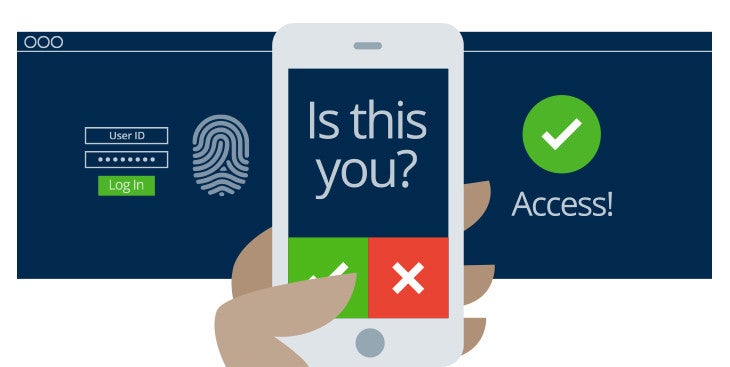
With this method, the account that you are trying to log into will create a popup message on your cell phone or other mobile device notifying you that someone is trying to log in and ask you to either allow or deny the attempt.
It’s called a “push” notification because the website that’s being logged into initiates the communication and allows you to hit a big red or green button to either allow or deny the login right from that notification.
What makes this method so secure is that A) you get real-time notification when someone is trying to log in to your account and B) any bad guy trying hack into your account must have physical access to your mobile device to be able to log in.
The downside to this is not all websites that support MFA support push notifications which leads us to…
Text or SMS Notification
Similar to a push notification, the account that you are trying to log into will initiate communication, but this time, instead of giving you the yes/no option in a quick popup message, it will send you a text message with a six -or eight- digit code you will need to manually enter on the website’s login page to continue.
It has the same advantages of a push notification but does have the additional downside of having to manually enter a potentially long code from your phone.
Mobile App on your device
The third method, involves you having to download a mobile app such as Google Authenticator , Duo Mobile, Microsoft Authenticator or LastPass Authenticator. Each of these apps constantly generates changing codes based on an algorithm that only it and the site you are trying to login to know.
So when you go to login to that website, the website will only let you in if the code its algorithm creates matches the code the algorithm on your phone produced. Since the codes are set to change every minute or two, it’s extremely unlikely a cyber crook could guess that password in so short a time.
Again, the main advantage here is that the attacker has to have physical access to your mobile device, but does come with the disadvantage of not getting any real-time notifications should someone else try to log into your account.
If you don’t know which one of these apps to use, PC Magazine’s recent review of The Best Authenticator Apps for 2021 can help you decide. And don’t feel like you have to choose only one of them. I use two different ones on my phone without issue. (However, having only one does make things easier to manage).
Physical Token
Physical tokens are small key-chain sized devices that do exactly the same thing as the mobile apps. They were prevalent in the days before smart phones became ubiquitous and have the same advantages and disadvantages of those mobile apps. There are also versions that look like a USB thumb drive that plug into your computer and provide the second form of authentication automatically.
Email Code Method:
This method works similarly to the text/SMS code method except that the code is sent to an e-mail account that you told the website to use. This is perhaps the least secure method of them all, because cyber criminals do not need physical access to a device in your possession and assuming you haven’t secured this account with 2FA, only need to guess your password to get in.
Does it mean you should not use it?
As a primary authentication method, I’d advise against it, but it’s not bad to have it set up as a backup or third way to authenticate should your phone be unavailable. (Some sites allow you to set multiple ways to authenticate while others only allow one way, which is why it’s called either Two- or Multi- factor authentication.) Just be sure to make sure you have the strongest possible password on that account.
Setting up 2FA/MFA
How you set all this up will differ with each website you use. But the options you will need to configure will often be found on the settings page under either the security or login sections.
Here are two examples of how to access them in Facebook and Google:
FACEBOOK:
- Click on the account dropdown button next to your profile picture and from the dropdown menu and select the Settings and Privacy option.

- When the dropdown menu changes, click on the Settings option

- When the settings page loads, click on Security and Login on the left-hand rail and look for the Two-Factor Authentication section and switch it to ON to begin setting it up.


GOOGLE/GMAIL:
- Make sure you are logged into your Google or Gmail account, and click on the button that looks like checkerboard on the upper right of the page and from the dropdown pick menu that appears click the Account button.

- Click on the Security link in the left-hand rail, then scroll down the page until you come to the Signing in to Google section. Under that click on the arrow next to 2-step verification to begin setting it up.


Friday, April 30, 2021
Cybersecurity: Pass the word about good passwords
 |
| Comic courtesy of xkcd.com. You can see the full comic here |
 |
| SOURCE: cybintsolutions.com |
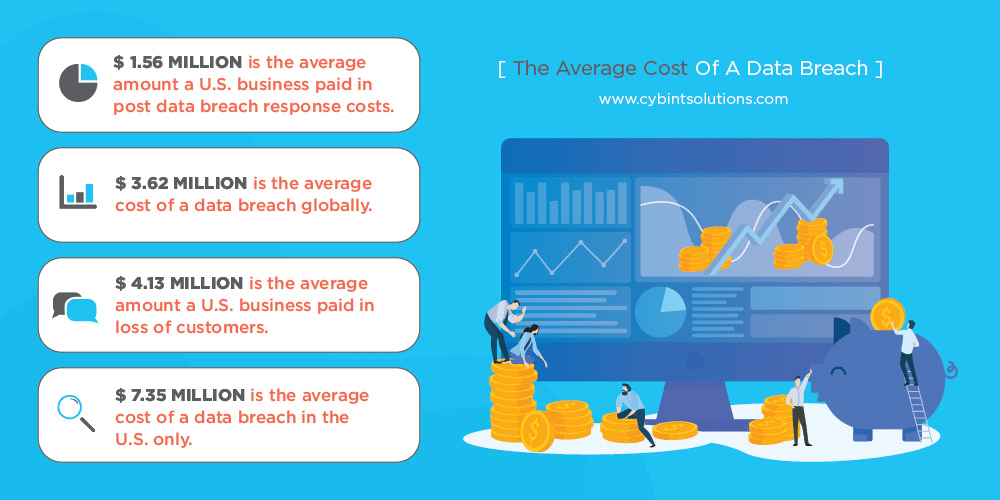
years, about 80 percent of beaches were caused by stolen passwords.
USE A LONG PASSWORD
The longer a password, the harder it is for hackers to figure out. Even if hackers use a fast computer to run through every possible combination of letters, numbers, and symbols, the longer the password, the more time it will take them to crack your account. And the longer it takes a hacker to do that, the more likely it is that they will give up on you and move to an easier target.
For instance, a simple eight-character password with all lowercase letters can be cracked in about five hours, where a password with 12 all lowercase characters would take slightly over 200 years. (Times are based on Tulane University's Brute Force Calculator)
USE A PHRASE AS YOUR PASSWORD
When I tell people they should have a long password, they naturally think about using a phrase or
passage of text they’ll remember. The problem is that hackers are well aware of this tactic and will also try using common or well-known quotes from literature, the bible, TV shows and movies to crack your password.
So while you might think “OpenThePodBayDoorsHal” maybe a good password because it long and has a mix of upper and lowercase letters, it’s also probably on the list of top five phases hackers will try because it's so obvious.
Your best bet here to use a nonsensical phrase or phrase that contains random words. Also do not use characters that are sequential on a keyboard, numbers in order or the widely used “qwerty” because those are also on the list of default passwords hackers will try to get into your account.
INCLUDE NUMBERS, SYMBOLS, AND MIXED-CASE LETTERS
By now we are all familiar with this as many sites require you to use symbols, numbers and letters in your passwords. One of the things I will do is come up with some phrase then substitute numbers or symbols for the following letters:
A =@ S = $ or 5 E =3 i =! or 1 O = zero
So if I decide to use the not-so-nonsensical phrase like: New Pair of Shirts
I can make it more secure by using the substitutions like I mentioned above to turn it into this: N3wP@1r0f$h1rt$
 |
If you use one of these as your password, you really need to change it immediately! (Source: zdnet.com) |
DO NOT REUSE PASSWORDS
If you only take away one thing from this post, remember this. Don’t use the same password on all your accounts!
Yes, I know it’s hard to remember just one password and now I’m telling you that you should have 20. But hackers know people are lazy and if they crack your e-mail or social media account password, the very next thing they are going to do is start trying to use that password on various banking and financial sites to see it if works.
I often council my employees at work to also change the passwords on their personal accounts whenever we detect that their work account password was compromised. I do this because even though our employees seldom use their work e-mail address as their username on personal sites, hackers are smart enough to try the password they cracked for Mary.Jones@MyCompany.org on accounts for mary.jones@gmail.com, mjones@gmail.com, etc.
USE A PASSWORD MANAGER
Okay, you’ve followed all my rules and created several strong passwords, but what good will they be if you can’t remember them when you need them?
The answer is simple. Stop trying to remember them and start using a password manger.
Password managers are small programs which you can install on your computer and phone which not only keep track of all your passwords, but also helps you create strong and different passwords for every site you visit. The beauty of using one is that you only have to remember a single, strong password and many can be unlocked by a finger print so you don’t even have to remember a password if you don’t want to.
Yes, some most modern browsers like Chrome and Firefox have features similar to this, but they are much less secure than dedicated password managers. So if your gmail account ever gets hacked, then all the passwords you have stored on your Google account will be exposed.
In my job, I use LastPass and have come to rely on it a lot. It works on both my phone and computer and integrates with Chrome pretty painlessly. I highly recommend it, but it’s not the only one out there. Here are a few others recommended by PC Magazine and CNET are worth checking out.
If you don’t want to spend money on one of these programs you can always do what Mrs. BlueScreamOfJeff does and turn one of those old-fashioned pocket phone/address books into an offline, physical password manager. Instead of using it to keep track of all her friends, family members and acquaintances, she uses each section to store the username and password for all her various accounts. For example on the “A” section pages, she has entries for her AOL, AirB&B and Applebees.com. Under the “B” section she has her Bank of America, Barnes and Noble and BBC.com login info.
Yes, this does go against “the rule” of not writing your passwords down, but it is OK to write them down as long as you store them in a secure location like a locked drawer when you’re not using it.
CHECK ON YOU PASSWORDS
Finally, you should periodically check to make sure your passwords are still secure and haven’t been hacked.
Sites like Have I Been Pwned?, BreachAlarm and Dehashed all let you check on whether your account has been compromised by a past data breach.
They are pretty simple to use. Just go to the page, enter your e-mail address and click the search button and these sites will then look through a list of accounts known to have been breached by hackers show you if your address was possibly compromised.
If it was, you should change that password immediately.
I know I’ve made it seem like creating and keeping your passwords safe is a lot of work. But like your mother always told you when you complained about having to eat your vegetables: You may not want to do it, but it's good for you.
Wednesday, March 31, 2021
Cybersecurity: Is there something phishy going on in your inbox?
 |
| SOURCE: Jeffrey L. Price, 2020 |
It’s because fish can’t resist them, and it seems we humans also have this same flaw. Send someone a flashy message promising them some reward or a vaguely worded threat and we just can’t resist clicking on the link or attachment in that message to see what it is.
Cybercriminals know this and depend on your trust and curiosity to make their scams work. And just like that poor trout who goes to investigate that shiny thing floating around in the water, it doesn’t end well.
So how do you avoid becoming some cyber-fisherman’s catch of the day?
The answer is deceptively easy. When it comes to e-mails -- and even text messages – trust nobody. Assume every message you get is fake until you can confirm it’s not.
And how do you go about confirming a message isn’t fake?
By following some simple precautions I outline below. While this list isn’t exhaustive and doesn’t guarantee you will never be fooled, you will be surprised how often it can save you from being hooked.
Skepticism is your best defense
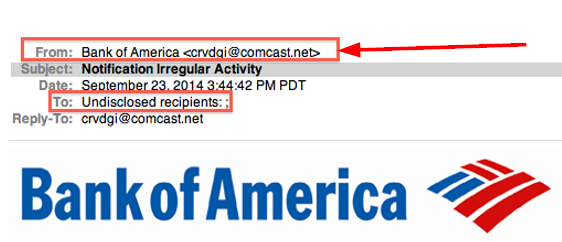
Look closely at the display name and email address
Review the salutation

Be warry of urgent or threatening language
Guard your confidential information as if your life depended on it
Think before you click
 |
Note the link in the body says one thing, but when you hover over it, the real link shows a different address! |
hover your mouse over the link. If the link address looks weird, DON’T click on it. If you’re skeptical about the link, call an IT pro to have them check it out. If you don’t have a favorite IT person you can bug, then look up the business’ contact information via a google search or go old-school and use a phone book, and call the company and ask them about the message.
Don’t click attachments either
Texts messages aren’t any safer
Sunday, February 28, 2021
Cybersecurity speak: Is it all geek to you?

MALWARE
RANSOMWARE
Ransoms can be as “small” as $100 or range into the
millions. It’s often demanded in bitcoin, a type of virtual or electronic
currency that is hard to trace, and there is no guarantee that even if you pay
the ransom, the hostage taker will give you the key to unlock your data.
Most people have probably heard about the recent ransomware
attacks on big hospitals and municipal governments, but do not let that fool
you into thinking that cybercriminals only target big institutions with deep
pockets.
They don’t.
PHISHING
 |
| SOURCE: Jeffrey L. Price, 2020 |
your computer or lockup your data. It’s to trick you into willingly reveal your sensitive information or data to an attacker. Attackers will do this by trying to impersonate someone you know or an institution you trust to not only get you to reveal your usernames, passwords and/or financial information, but also trick you into sending money to some fake account they have control of. Phishers also use these types of attacks to gather other background information on you such as your birthdate, social security number, previous employers, salary, etc. so they can use that information to open fake credit accounts in your name.
SPEAR-PISHING
SMISHING
VISHING
SOCIAL ENGINEERING
AGE DOESN’T MATTER
 |
| SOURCE: Proofpoint 2020 State of the Phish report |
and older folks, you’d be dead wrong. “Digital natives” – the generation who has never known a world without all this technology – aren’t immune from falling victim to cybercrime.